Free
Freeforever
- Any 3 widgets, forever
- No account, no telemetry
- Yours. Full stop.
Live widgets rendered straight onto your wallpaper: clocks, weather, mail, cameras, your whole homelab. Behind your windows while you work, never stealing a click. It's there whenever you glance.
glancedock.exe · one native process · zero servers
arrange once, glance forever: this is what GlanceDock feels like
One keystroke hides mail, notes, and cameras: everything personal. Instantly.
No account required, no cloud sync, no telemetry. Widgets connect to the services you use: your mail server, your homelab, your weather. The app also checks GitHub for updates.
Mail passwords, API tokens, camera credentials go straight to Windows Credential Manager, never a plain-text config. The layout file on disk is provably secret-free.
Keys are checked on your machine without contacting a server. Website accounts are optional and can store a key for recovery; the app's license check works without them.
Two screenshots from a normal two-monitor Windows 11 desktop. No staging, no composite.
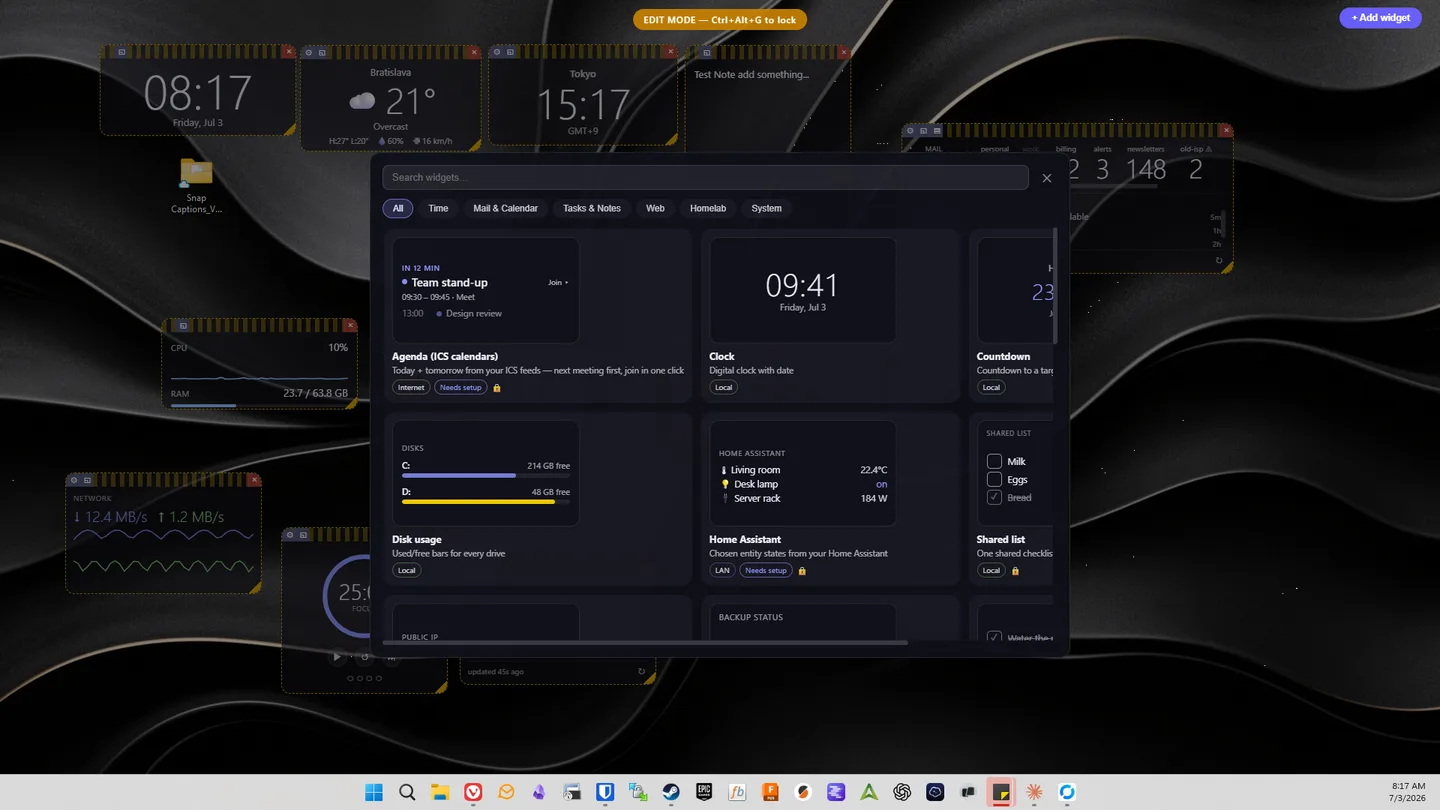
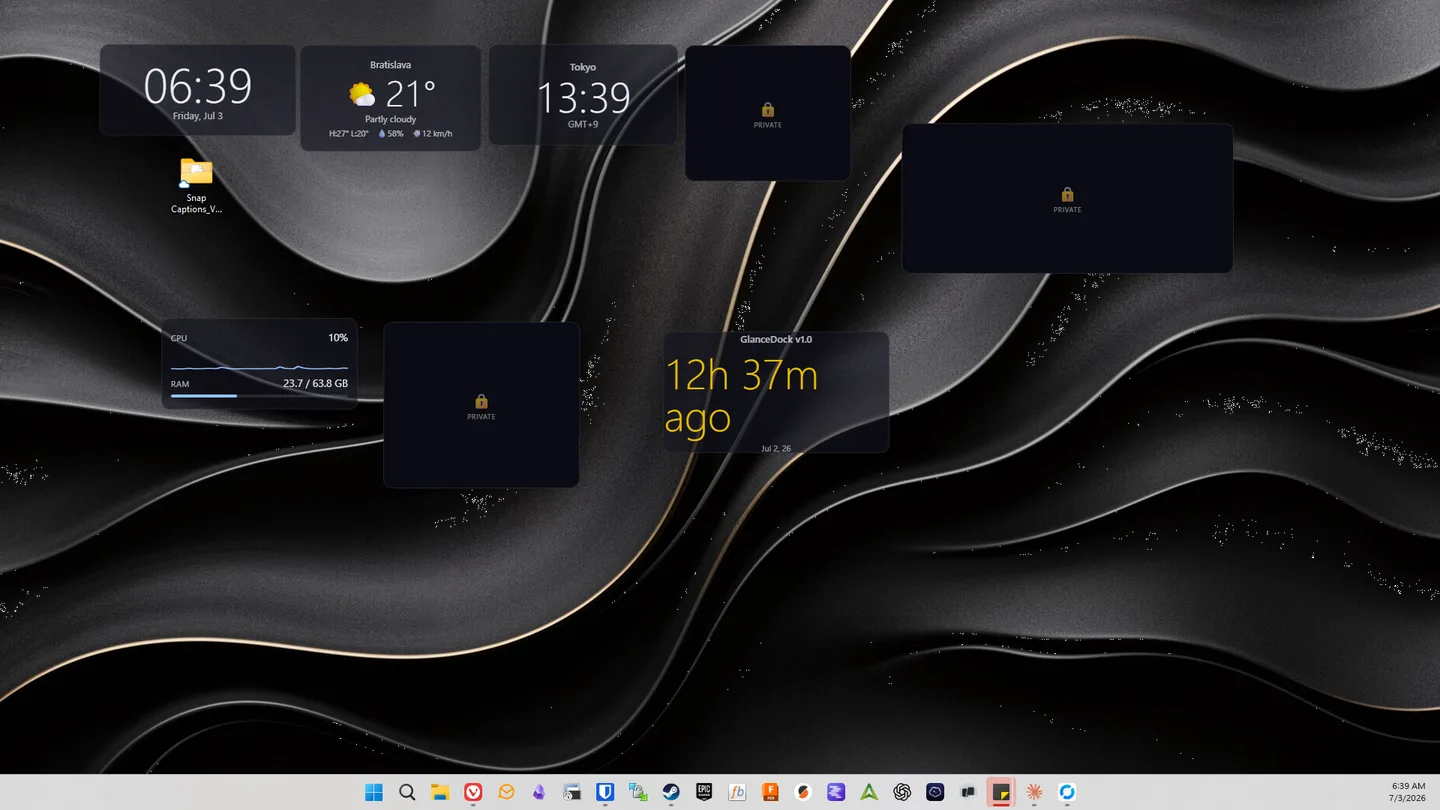
Big digital clock with the date.
The time in any timezone, DST-correct.
Days and hours to a date, then counts up after.
A quiet mini-month with today highlighted.
Moon phase, rise/set, twilight and dark-sky windows, computed on-device.
A single countdown timer or lap stopwatch, driven from glance mode.
Unread counts and latest-message previews across several IMAP accounts, with new-mail toasts.
Today and tomorrow's meetings from ICS feeds, next meeting first, with a join button.
Overdue and upcoming tasks, glance check-off, quick-add.
A simple local checklist, checkable without entering edit mode.
Read-only view of a todo.txt file: priorities, due dates, projects.
A persistent note on your desktop.
One checklist mirrored across every instance, on every monitor.
Renders any local JSON status file: the escape hatch for your own scripts.
A curated shelf of one-click copyable snippets.
Focus timer in four looks, phase-end toast and chime, daily goal dots.
Your Pomodoro history: today, a trend chart, streak and best day.
Tap-to-complete circles, streaks, and a month heatmap.
Today's doses, log them, snooze reminders, and watch optional inventory.
Log feeds, ratios, and hydration; an estimated peak from your own history.
Live RTSP cameras: 1/2/4 tiles, cycling, and fullscreen.
Ad-free video, Shorts, and playlists via yt-dlp, up to 1080p DASH.
Queue video or audio-only downloads to a folder with live progress, resume, and cancel.
Local video files and playlists, ratio-correct, full controls.
Local photo slideshow: file, list, or watched folder; fade, slide, Ken Burns.
Current conditions from Open-Meteo, with city search and no API key.
Air quality, UV index, and a sunrise-to-sunset day arc.
A few quiet headlines from any feed.
The next public holiday and countdown for any of 150+ countries.
Recent quakes near you on a radar plot (USGS, keyless).
The Space Station live on a world map, orbit trail, and visible-pass predictions.
Live lightning strikes near you on a distance radar.
A comic, a quote, or a dad joke. Your small daily lift.
On-demand download / upload / ping, run against Cloudflare.
Expiry countdown for the domains you own.
Up/down monitor counts and what's currently down.
Per-node CPU/RAM gauges, storage pools, and every VM/LXC across the cluster.
Array capacity and health, per-disk usage/temps/SMART, CPU/RAM, dismissible notifications.
Devices online/offline in your tailnet, key-expiry warnings.
Chosen entity states: temps, switches, sensors.
TCP reachability and response times in five looks, with down-host toasts.
SSL/TLS certificate expiry for your hosts, with days-left chips.
Container status across your Portainer environments, with optional controls.
Read-only live values from selected LAN MQTT topics.
NTP offset, round trip, and jitter without changing your clock.
WAN status, client counts, and device health from your UniFi controller.
Devices seen in your local ARP cache, with saved labels and new-arrival flags. No scanning or probing.
CPU and RAM with a history sparkline.
Utilization sparkline, VRAM bar, and temperature. NVIDIA-rich, with AMD/Intel fallback.
Fill level for every drive.
Live up/down per interface and a 60-second sparkline.
Charge, charging state, and runtime at a glance.
Current Windows media with playback controls.
Output switching and per-app Windows audio controls.
Convert units across 18 quantity categories with standards-backed factors.
JSON pretty-print & validate, Base64 encode/decode, right on the desktop.
Pick screen colours, copy HEX/RGB/HSL values, and keep a local palette.
Explain standard cron expressions and preview upcoming runs, or turn a schedule into cron.
Decode token headers, claims, and expiry locally. Does not verify signatures.
Convert Unix, ISO 8601, and local date-times with DST-aware results.
Generate UUIDs, ULIDs, and NanoIDs locally in one click.
Strong passwords & diceware passphrases, one click, fully offline.
Verify local files and pasted text with modern and legacy checksums.
Generate QR codes and 1-D barcodes locally.
Drop images to convert and shrink them to WebP/JPEG/PNG with an exact size preview.
Let guests scan to join your Wi-Fi with no password to dictate.
Your public IP, loud red when it stops matching your VPN prefix.
A short-session arcade game: steer the paddle and clear the bricks.
A Conway's Game of Life sandbox: draw cells, play, and watch.
Flip a 3D coin, roll rattling dice, or spin a Wheel of Fortune, with sound.
Roll a configurable 3D polyhedral die for tabletop sessions.
A fast local logic puzzle: turn every light off.
Any three widgets, free forever. One payment unlocks unlimited, no subscription, ever.
Something else? The docs cover setup, licensing, and the offline license in depth.
Yes. GlanceDock is built natively for Windows 10/11 and uses WebView2 (which ships with current Windows).
There is no app telemetry, cloud sync, or account requirement, and license checks are offline. Widgets contact the services they use (your mail server, homelab, YouTube, etc.). Packaged builds also check GitHub for updates after startup and periodically.
In Windows Credential Manager, the OS's own encrypted vault, never in a plain-text config file. The layout file on disk is provably secret-free.
No. They're click-through by default; your clicks reach the desktop. Only the specific control you hover becomes interactive.
It plays the raw video/audio streams directly, which carry no injected ads. It uses the widely-used yt-dlp tool, which you can update in one click when YouTube changes.
Fully supported: a widget layer per display, and drag widgets between them.
Yes, free forever for up to 3 widget instances — any 3 widgets you like, since every widget type is included in the free tier. No account, no telemetry, no time limit. To go beyond three there is a single one-time payment: during the public beta a Founder license is $9, and it stays price-locked forever, covering every 1.x release and future major versions at that same $9. From version 1.0 the Standard license is $19. Keys are verified offline on your machine. The app never phones home to activate.
Free for any three widgets. No account. Installed in under a minute.